
• About
    • Who We Are
    • What We Do
    • The Management Team
    • Global
  • Solutions
    • Microsoft Dynamics 365 CRM
    • Cloud Technology
    • Business Central
    • Data and AI
    • Enterprise Content Search
  • Services
    • AI Solutions
      • Getting Ready for AI 
      • Dynamics 365 Agents
      • ECLEVA Agents
    • Business Systems Consulting
    • Enterprise Resource Planning (ERP)
      • Wiise Business Central
    • CRM & Marketing Automation
    • Business Intelligence
    • PowerApps
      • HSE App by ECLEVA
    • RPA
  • Sectors
    • Corporate & SME
    • Not-For-Profit
    • Construction
    • Financial Services
    • Education
    • Manufacturing
    • Government
  • Customer Stories
  • Insights
    • Blog
    • News
    • Videos
  • Contact
    • Contact ECLEVA
    • Customer Support
Get in touch
  • About
    • Who We Are
    • What We Do
    • The Management Team
    • Global
  • Solutions
    • Microsoft Dynamics 365 CRM
    • Cloud Technology
    • Business Central
    • Data and AI
    • Enterprise Content Search
  • Services
    • AI Solutions
      • Getting Ready for AI 
      • Dynamics 365 Agents
      • ECLEVA Agents
    • Business Systems Consulting
    • Enterprise Resource Planning (ERP)
      • Wiise Business Central
    • CRM & Marketing Automation
    • Business Intelligence
    • PowerApps
      • HSE App by ECLEVA
    • RPA
  • Sectors
    • Corporate & SME
    • Not-For-Profit
    • Construction
    • Financial Services
    • Education
    • Manufacturing
    • Government
  • Customer Stories
  • Insights
    • Blog
    • News
    • Videos
  • Contact
    • Contact ECLEVA
    • Customer Support
Get in touch
  • About
    • Who We Are
    • What We Do
    • The Management Team
    • Global
  • Solutions
    • Microsoft Dynamics 365 CRM
    • Cloud Technology
    • Business Central
    • Data and AI
    • Enterprise Content Search
  • Services
    • AI Solutions
      • Getting Ready for AI 
      • Dynamics 365 Agents
      • ECLEVA Agents
    • Business Systems Consulting
    • Enterprise Resource Planning (ERP)
      • Wiise Business Central
    • CRM & Marketing Automation
    • Business Intelligence
    • PowerApps
      • HSE App by ECLEVA
    • RPA
  • Sectors
    • Corporate & SME
    • Not-For-Profit
    • Construction
    • Financial Services
    • Education
    • Manufacturing
    • Government
  • Customer Stories
  • Insights
    • Blog
    • News
    • Videos
  • Contact
    • Contact ECLEVA
    • Customer Support
  • About
    • Who We Are
    • What We Do
    • The Management Team
    • Global
  • Solutions
    • Microsoft Dynamics 365 CRM
    • Cloud Technology
    • Business Central
    • Data and AI
    • Enterprise Content Search
  • Services
    • AI Solutions
      • Getting Ready for AI 
      • Dynamics 365 Agents
      • ECLEVA Agents
    • Business Systems Consulting
    • Enterprise Resource Planning (ERP)
      • Wiise Business Central
    • CRM & Marketing Automation
    • Business Intelligence
    • PowerApps
      • HSE App by ECLEVA
    • RPA
  • Sectors
    • Corporate & SME
    • Not-For-Profit
    • Construction
    • Financial Services
    • Education
    • Manufacturing
    • Government
  • Customer Stories
  • Insights
    • Blog
    • News
    • Videos
  • Contact
    • Contact ECLEVA
    • Customer Support
Blog
Home Uncategorized Adaptive Cards – open yourself to more content
IT

Adaptive Cards – open yourself to more content
July 10, 2020
Enhance User Engagement with Adaptive Cards 

In today’s digital landscape, where content drives engagement, businesses are constantly seeking innovative ways to deliver interactive and dynamic content across multiple platforms. Microsoft Adaptive Cards offer a powerful solution, enabling seamless integration and a consistent user experience across various applications. 

What Are Adaptive Cards? 

Adaptive Cards are a JSON-based UI framework that allows developers to create rich, interactive content adaptable to any platform. Designed to blend naturally with host applications, Adaptive Cards ensure that the content matches the platform’s native look and feel. For example, a contact card in Dynamics 365 can seamlessly appear in Microsoft Teams with Teams’ distinctive interface. 

Popular Platforms Supporting Adaptive Cards: 

  • Microsoft Teams 
  • Outlook Actionable Messages 
  • Bot Framework Webchat 
  • Cortana Skills 
  • Windows Timeline 
  • Windows Notifications 

As Microsoft states, “Users win because everything feels familiar. Host apps win because they control the user experience. And Card Authors win because their content gets broader reach without any additional work.” 

Step-by-Step Guide: Creating and Sending Adaptive Cards in Outlook with Power Automate 

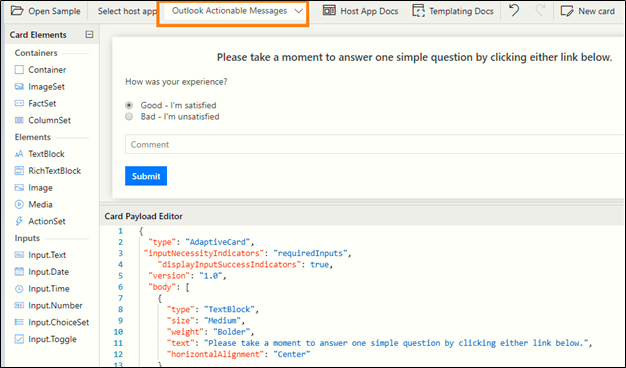
Step 1: Design Your Adaptive Card 


  • Visit https://adaptivecards.io/designer/ to create your card by dragging and dropping elements or customizing existing templates. 
  • Select Outlook Actionable Messages as the host app for seamless integration. 
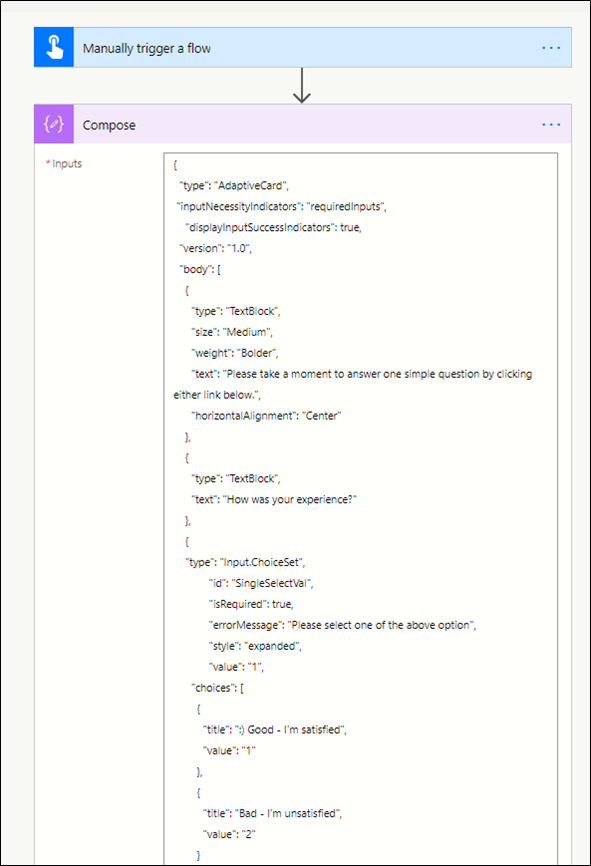
MicrosoftTeams-image-10
Sample JSON for an Adaptive Card: 
{
  “type”: “AdaptiveCard”,
  “inputNecessityIndicators”: “requiredInputs”,
  “displayInputSuccessIndicators”: true,
  “version”: “1.0”,
   “body”: [
    {
      “type”: “TextBlock”,
      “size”: “Medium”,
      “weight”: “Bolder”,
      “text”: “Please take a moment to answer one simple question by clicking either link below.”,
      “horizontalAlignment”: “Center”
    },
    {
	  “type”: “TextBlock”,
      “text”: “How was your experience?”
    },
    {
      “type”: “Input.ChoiceSet”,
      “id”: “SingleSelectVal”,
      “isRequired”: true,
      “errorMessage”: “Please select one of the above option”,
      “style”: “expanded”,
      “value”: “1”,
      “choices”: [
         {
           “title”: “Good – I’m satisfied”,
           “value”: “1”
         },
         {
           “title”: “Bad – I’m unsatisfied”,
           “value”: “2”
        }
       ]
    },
    {
     “type”: “Input.Text”,
     “placeholder”: “Comment”,
     “style”: “text”,
     “maxLength”: 0,
     “isRequired”: true,
     “errorMessage”: “Required”,
     “id”: “SimpleVal”
    }
   ],
  “actions”: [
    {
    “type”: “Action.Http”,
    “title”: “Submit”,
    “url”: “https://prod-29.southeastasia.logic.azure.com:443/workflows/b9277c7040154322b45dbf536ba0f6ac/triggers/manual/paths/invoke?api-version=2016-06-01",
    “id”: “submit”,
    “style”: “positive”,
    “method”: “POST”,
    “body”: “{\”choices\”:\”{{SingleSelectVal.value}}\”,\”comment\”:\”{{SimpleVal.value}}\”}”,
      “headers”: [
      {
        “name”: “Authorization”,
        “value”: “”
      },
      {
        “name”: “Content-type”,
        “value”: “application/json”
      }
     ]
    }
 ]
}
Step 2: Automate Email Delivery with Power Automate 
  • In Power Automate, create a new flow with a trigger (e.g., manual or automated). 
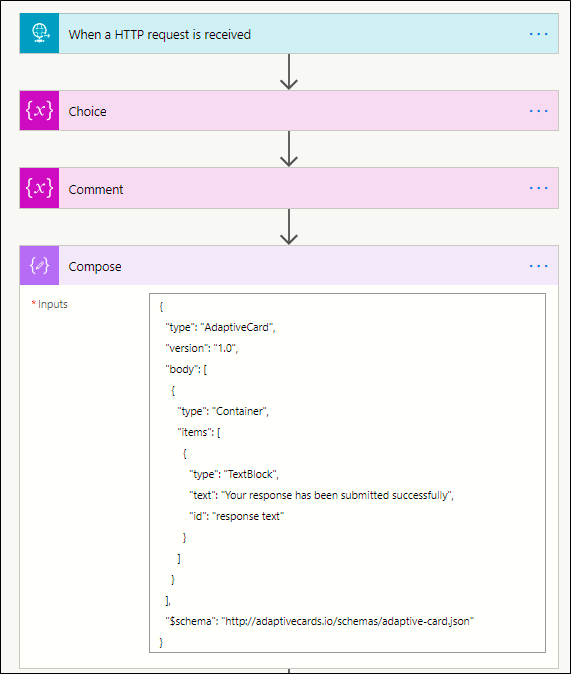
  • Add a Compose action and paste the Adaptive Card JSON. 
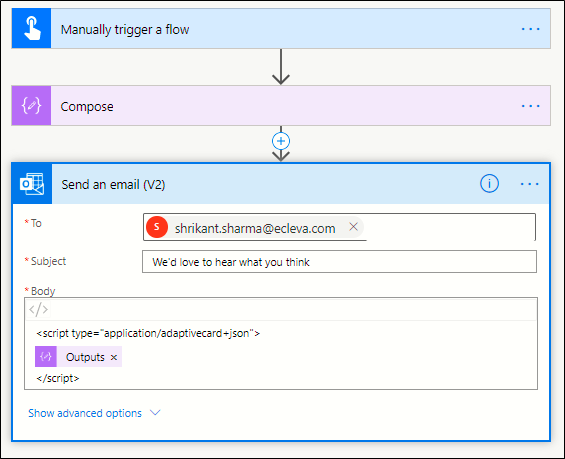
  • Use the Send an Email (V2) action and insert the Adaptive Card within HTML tags: 
<script type="application/adaptive card+json">
</script>
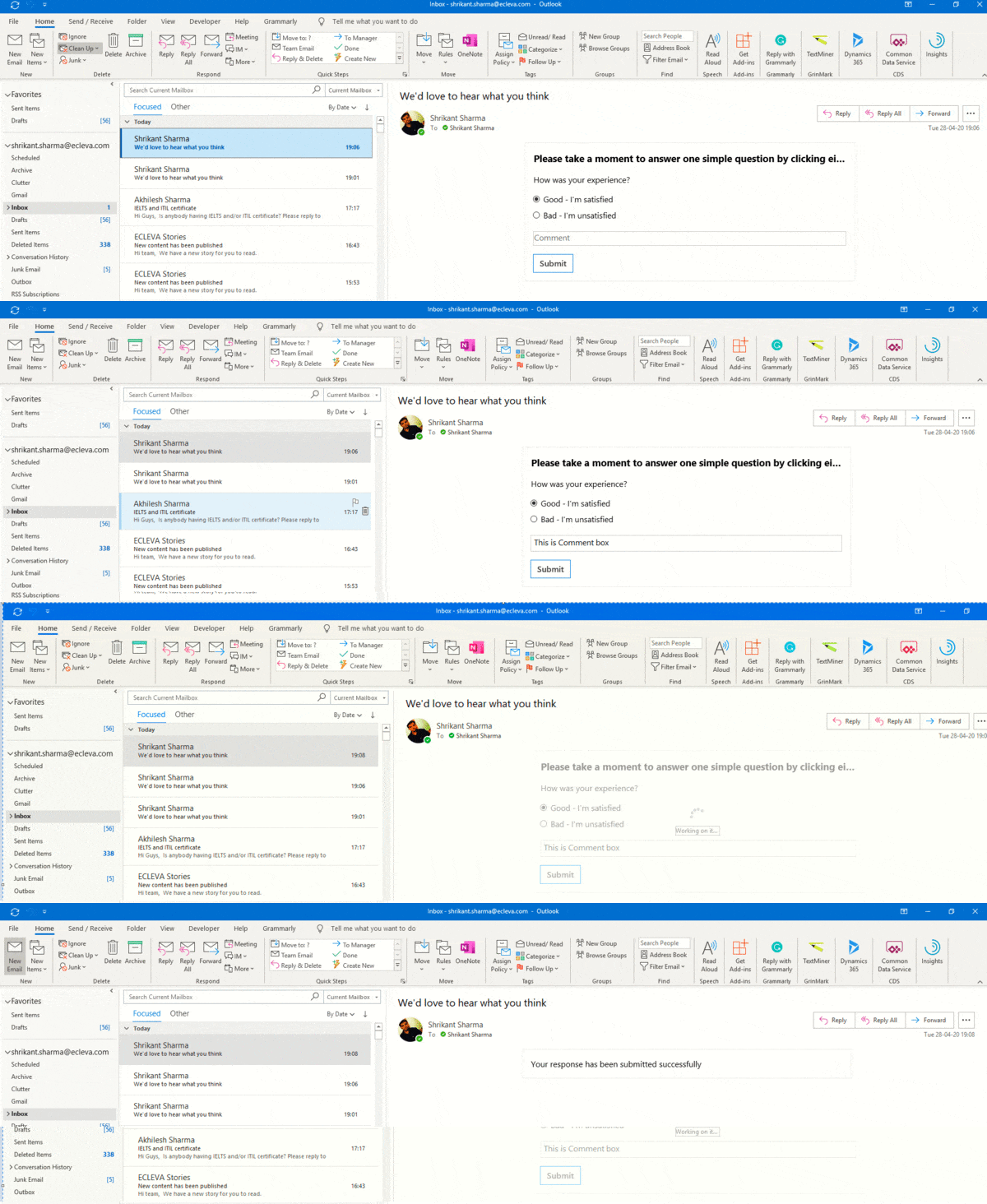
Step 3: Capture Responses with Power Automate 
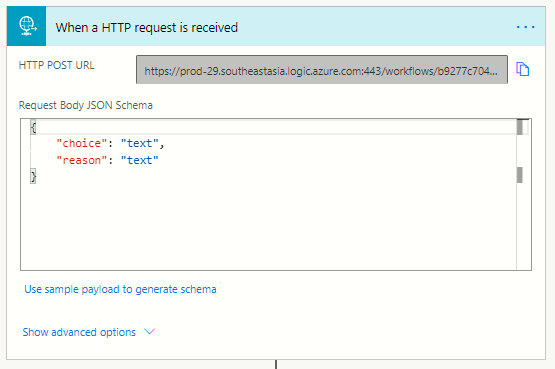
  • Create a new flow with the When an HTTP request is received trigger. 
  • Define the JSON schema to collect responses: 
{ 
  “choice”: “text”, 
  “reason”: “text” 
}
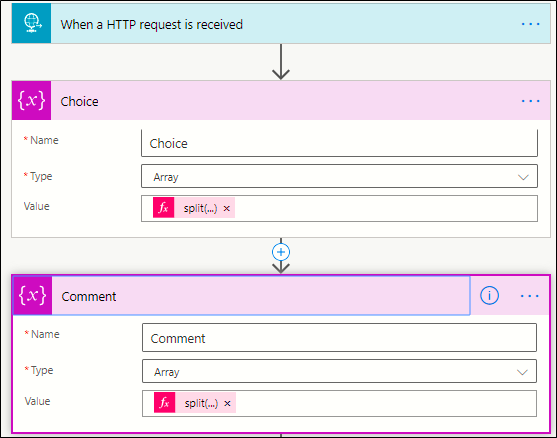
  • Add two variables to store the response. You can use the snippet below to extract the response. 
split(triggerBody()?[‘choices’],’,’) 
split(triggerBody()?[‘reason’],’,’)
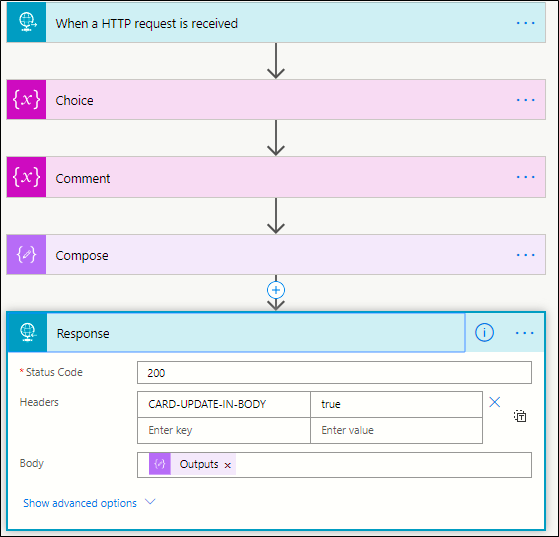
  • Send confirmation notifications and update the Adaptive Card with the response using the Response action. 
Benefits of Using Adaptive Cards for Business Communication 
  • Cross-Platform Compatibility: Deliver content seamlessly across Microsoft Teams, Outlook, and more. 
  • Enhanced User Engagement: Simplify interactions with intuitive and responsive design. 
  • Streamlined Automation: Integrate with Power Automate for dynamic workflows and real-time feedback collection. 
CARD-UPDATE-IN-BODY = True
Conclusion 

Adaptive Cards empower businesses to create dynamic, interactive content that enhances user engagement across multiple platforms. By integrating Adaptive Cards with tools like Power Automate, organizations can streamline workflows and improve communication efficiency. Start leveraging Adaptive Cards today to transform how you connect with your audience! 

Have ideas to improve Adaptive Cards or innovative use cases? Share your thoughts in the comments below or contact ECLEVA to explore how we can bring your ideas to life! 

115
5 ways MS Power Platform gives your company a significant competitive advantage5 ways MS Power Platform gives your company a significant competitive advantageJuly 13, 2020
Getting Customer feedback is important! Acting on it is vital! Here is how ECLEVA is using insights to embed a Customer Centric mindset.July 14, 2020Getting Customer feedback is important! Acting on it is vital! Here is how ECLEVA is using insights to embed a Customer Centric mindset.

Leave a Reply Cancel reply

Your email address will not be published. Required fields are marked *

Categories
  • Blog (40)
    • AI (3)
    • Business (10)
    • Business Intelligence​ (3)
    • Digital Transformation (10)
    • IT (23)
    • Marketing (1)
  • Dynamic 365 (8)
  • News (18)
    • Business (11)
    • IT (5)
    • Sales (2)
  • Video (34)
    • Business (29)
    • Business intelligence (3)
    • Digital transformation (18)
    • IT (23)
    • Process automation (2)
Recent Posts
  • Reconciliation Reimagined: How Copilot and Business Central Transform Finance Operations
  • ERP or CRM First? How Senior Leaders Can Make the Right Call 
  • ECLEVA Presents: Real Ways AI Can Power Your Business
  • Microsoft Dynamics 365 Migration A Step-By-Step Guide
  • Microsoft Dynamics 365: A Quick Tour of Features and Costs


ECLEVA
© ECLEVA 2026.

All rights reserved.
Privacy Policy

Solutions

Business Systems Consulting

Customer Engagement (CRM) & Marketing Automation

Rapid Application Development (PowerApps)

Process Automation (RPA)

Business Intelligence(Power BI)

Sectors

Corporate & SME

Not-for-profit

Construction

Financial Services

Education

Contact

Address:

100 Walker St.
North Sydney 2060

Phone:

+61 2 9467 9300

Address:

401-402, R M Arcade, Near Goverdhan Park,Taxsila School Road, Vastral, Ahmedabad 382418

Phone:

+91 98244 60130

Website:

www.ecleva.com

#integrio_button_6972f509f1baa .wgl_button_link { color: rgba(255,255,255,1); }#integrio_button_6972f509f1baa .wgl_button_link:hover { color: rgba(12,90,219,1); }#integrio_button_6972f509f1baa .wgl_button_link { border-color: rgba(255,255,255,1); background-color: rgba(49,49,49,0); }#integrio_button_6972f509f1baa .wgl_button_link:hover { border-color: rgba(255,255,255,1); background-color: rgba(255,255,255,1); }#integrio_button_6972f509f1baa.effect_3d .link_wrapper { color: rgba(255,255,255,1); }#integrio_button_6972f50a08706 .wgl_button_link { color: rgba(49,49,49,1); }#integrio_button_6972f50a08706 .wgl_button_link:hover { color: rgba(255,255,255,1); }#integrio_button_6972f50a08706 .wgl_button_link { border-color: rgba(12,90,219,1); background-color: rgba(49,49,49,0); }#integrio_button_6972f50a08706 .wgl_button_link:hover { border-color: rgba(12,90,219,1); background-color: rgba(12,90,219,1); }#integrio_button_6972f50a08706.effect_3d .link_wrapper { color: rgba(12,90,219,1); }#integrio_soc_icon_wrap_6972f50b4b5ab a{ background: #0C5ADB; border-color: transparent; }#integrio_soc_icon_wrap_6972f50b4b5ab a:hover{ background: #ffffff; border-color: #0C5ADB; }#integrio_soc_icon_wrap_6972f50b4b5ab a{ color: #ffffff; }#integrio_soc_icon_wrap_6972f50b4b5ab a:hover{ color: #0C5ADB; }.integrio_module_social #soc_icon_6972f50b4b6091{ color: #ffffff; }.integrio_module_social #soc_icon_6972f50b4b6091:hover{ color: #ffffff; }.integrio_module_social #soc_icon_6972f50b4b6091{ background: #44b1e4; }.integrio_module_social #soc_icon_6972f50b4b6091:hover{ background: #44b1e4; }.integrio_module_social #soc_icon_6972f50b4b63f2{ color: #ffffff; }.integrio_module_social #soc_icon_6972f50b4b63f2:hover{ color: #ffffff; }.integrio_module_social #soc_icon_6972f50b4b63f2{ background: #0077b5; }.integrio_module_social #soc_icon_6972f50b4b63f2:hover{ background: #0077b5; }#integrio_soc_icon_wrap_6972f50b52216 a{ color: #ffffff; }#integrio_soc_icon_wrap_6972f50b52216 a:hover{ color: #0c5adb; }
Slide

In-Workshop
Step 1: Discover Your Business Challenges

We begin by exploring the parts of your organisation where work feels slow, repetitive, inefficient or difficult to scale. This includes operational bottlenecks, manual processes, disconnected systems, high-touch workflows, and areas where teams rely heavily on workarounds. The goal is to understand the real challenges behind your daily operations so we can identify processes that are strong candidates for improvement, automation or AI assistance.

Slide
In-Workshop
Step 2: Prioritise What Matters Most

Not all problems are equal. In this stage, your team collaboratively prioritises the challenges identified, ranking them based on business impact, urgency, and strategic importance.

This ensures the workshop stays focused on what truly matters — not theoretical use cases — and that every opportunity we identify is anchored to real, agreed business priorities.

Slide
Post-Workshop
Step 3: Map AI & Automation Opportunities

Following the session, ECLEVA translates your prioritised challenges into practical AI and automation opportunities that align to your current Microsoft environment, such as:

Microsoft 365 & Copilot
Dynamics 365 & Business Central
Power Platform (Power Apps, Power Automate, Power BI)
Each opportunity is assessed using a Value × Ease framework, clearly highlighting:

Quick wins
High-impact initiatives
Opportunities requiring more planning or investment
We then present these findings back to your team, walking you through the prioritisation, recommended sequencing, and logical next steps. You’ll receive a clear, visual prioritisation that makes decision-making easy.

Slide
Post-Workshop + Optional Next Phase
Step 4: Feasibility & Readiness Check

We complete a high-level feasibility and readiness check, covering:

Data availability and quality
System and integration readiness
Security, governance, and compliance considerations
Risks, blockers, and any preparation required
The outcome is a clear, actionable roadmap outlining recommended next steps, sequencing, and indicative effort.

If you choose to proceed, ECLEVA can support you through:

Detailed solution design
Proofs of concept or pilots
Implementation and change enablement
Always at your pace, aligned to your goals.

Slide
LEAVE WITH A CLEAR, ACTIONABLE ROADMAP
Step 5: Recommended Next Steps

At the end of the workshop, we consolidate your insights into a clear, practical set of next steps. This includes prioritized opportunities, suggested sequencing, indicative effort levels and a path that aligns to your goals, technology landscape and operational priorities. You leave with an actionable starting point — something you can share with leadership or use to guide your internal planning.

previous arrow
next arrow

    Get Your Free Migration Quote

    Receive detailed migration plan within 24 hours